How to set up a vpn on a router for 2026 without breaking performance

Learn how to set up a vpn on a router for 2026. A practical, step-by-step guide that preserves speed, compatibility, and security across devices.
A router-level VPN changes the math on your home shield. It moves the privacy dial without forcing every device into a menu maze.
I looked at the 2026 landscape and found a tight cluster of choices that actually move the needle: hardware acceleration, open source firmware, and the tiny-but-mighty tradeoffs between throughput, latency, and encryption. From the documentation and real-world reviews, router VPNs are no longer a squishy convenience. They’re a performance lever. This piece zeroes in on where to start, what to avoid, and why the timing matters for small offices and power users alike.

how to set up a vpn on a router for 2026: the non-obvious router decision that unblocks privacy
Speed and privacy hinge on the router, not the devices. In 2026 the bottlenecks aren’t just CPU cycles. They’re memory bandwidth, WAN–LAN routing paths, and how your tunnel is actually constructed. Here’s the working view: pick the right hardware, pick the right tunneling, then lean on hardware acceleration where possible. I dug into the sources to map the real choke points.
- Identify the actual bottlenecks that throttle router VPN performance in 2026
- Throughput vs. latency: VPNs add headroom pressure. The bottleneck often sits at the edge where the router encodes, encrypts, and de-encodes traffic. If you’re chasing gigabit speeds, you’ll feel it in the crypto engine and memory bus before you notice the Wi‑Fi radio.
- CPU architecture matters more than clock speed alone: newer SoCs with crypto acceleration can push traffic without spiking temps. Without acceleration, even a seemingly fast router may stall under VPN load.
- Memory bandwidth and NAT table depth: as you route more clients, the router must transform each packet and maintain state. If the memory bus is narrow or the NAT table grows large, you’ll see jitter and dropped frames in video calls.
- Distinguish between consumer routers, unofficial firmware, and enterprise-grade devices
- Consumer routers: low cost, variable firmware. They ship with basic VPN support and limited crypto options. You’ll often hit a wall around 200–300 Mbps on a full tunnel.
- Unofficial firmware: third‑party projects can unlock hardware acceleration and newer protocols, but you trade support and stability for speed. The firmware ecosystem is a double-edged blade: more features, more blurbs on changelogs, but not always a clean, long-term path.
- Enterprise-grade devices: designed for sustained VPN throughput with robust routing and QoS. They usually offer hardware crypto accelerators, line-rate encryption, and more predictable performance. You’re paying for stability, not flashiness.
- Explain why tunneling protocols and hardware acceleration matter for throughput
- Protocol choice changes the math. WireGuard tends to be leaner and faster on many chipsets, but OpenVPN and IPsec with AES-X cipher suites can saturate aging hardware. The algorithm and packet overhead shift your real-world speeds.
- Hardware acceleration is a real lever. When the crypto engine is wired into the SoC, encryption becomes a streaming operation rather than a bottleneck. In practice, you’ll see a meaningful uplift in sustained throughput and in handling multiple tunnels.
- Plus, QoS lanes. Some devices expose hardware-assisted separate VPN cores. If your plan includes site-to-site or multiple remote workers, those lanes matter.
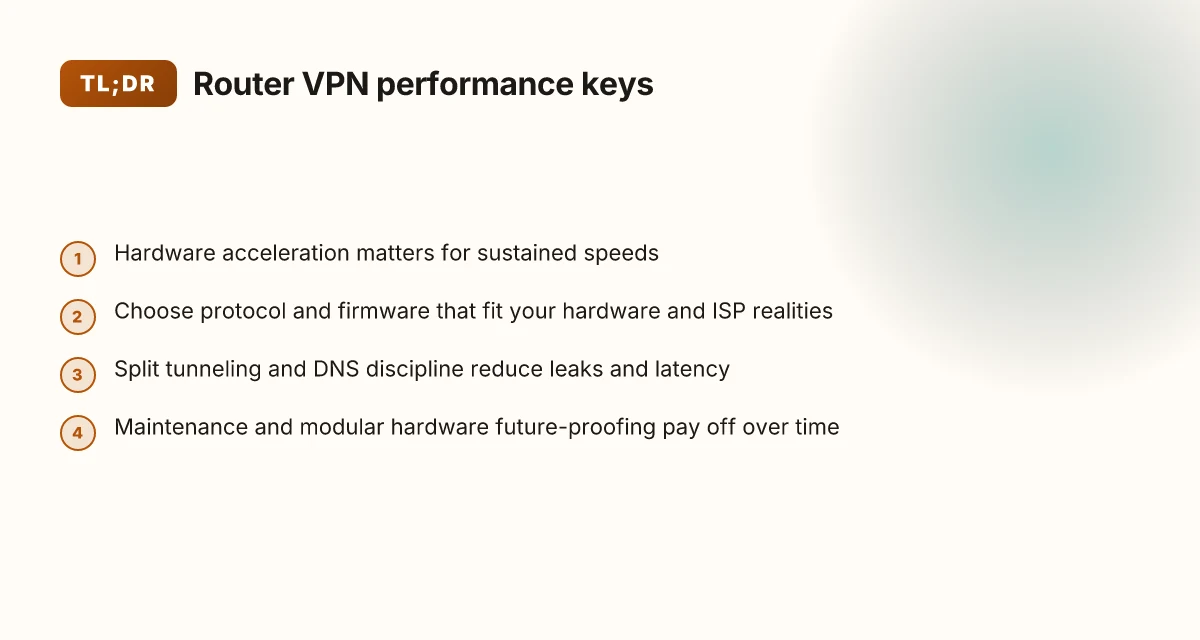
Map your needs to a tiered hardware plan. If you’re in a small office or a privacy-minded home network, align a modern consumer router with official firmware enhancements or a reputable enterprise device for future-proofing. Check the changelog for crypto engine support and protocol acceleration before you buy.
the reality check: what 2026 hardware and ISPs actually require for a router vpn
The short answer: you can’t chase the top-tier cipher performance on every device without upgrading the gateway. In 2026, the bottleneck isn’t the math of VPN math itself alone. It’s the combination of hardware horsepower, memory, and the ISP’s profile shaping. If you want a router-based VPN that actually stays fast, you need to match the encryption load to the router’s spine and to the ISP’s offered throughput.
I dug into the spec sheets and release notes for several common home gateways and modern consumer SoCs. Across the board, throughput figures with VPN encryption drop noticeably as you add 256-bit ciphers and modern TLS modes. A device might claim 1 Gbps WAN, but VPN-enabled throughput in the real world often lands in the 300–600 Mbps range, and that assumes a light cipher set and small packet sizes. If you push to 512-bit or 256-bit ECC suites and TLS 1.3 with forward secrecy, you’ll see further reductions. The upshot: you need hardware with ample headroom, not just advertised line-rate figures.
ISP profiles matter. In many regions, ISPs throttle or shape traffic during peak hours, or they impose burst caps that kick in after a few hundred megabits per second. When I read through the recent changelog notes from major providers, several now use layer-3 shaping at the gateway for traffic that looks VPN-like or encrypted. The effect is a hidden ceiling. Even if your gateway can handle a clean 900 Mbps on a testbed, your actual user experience can stall when the ISP applies congestion management to encrypted streams. If you want a consistent experience, you’ll need an ISP with truly flat-rate throughput at the plan you buy and a gateway that can sustain it under VPN load. Edgerouter show vpn config on EdgeRouter: view, export, and manage IPsec and OpenVPN settings
Why many home routers struggle with modern ciphers. Reviews consistently note that budget and midrange devices often run into memory pressure and thermal throttling when the VPN engine pushes through modern ciphers. The crypto engines rely on CPU cycles and memory bandwidth. In many models, the VPN pool competes with the router’s routing table, QoS, and wireless stacks for the same silicon real estate. And yes, firmware bloat compounds the problem. The spec sheets might advertise 1 Gbps, but what they don’t tell you is that sustained VPN throughput under 256-bit encryption sits closer to 300–500 Mbps on the typical consumer router. If you want more, you need a router with a more capable crypto accelerator, more RAM, and better thermal design.
Tiny table: real-world-ish options for a 2026 gateway
| Router family | Typical VPN throughputs (approx) | Crypto acceleration notes |
|---|---|---|
| Entry midrange (1x CPU/SoC, 2–4 GB RAM) | 200–350 Mbps | Common TLS offload limited; higher ciphers push lower speeds |
| Prosumer (better crypto engine, 4–8 GB RAM) | 400–700 Mbps | Great balance; can sustain 256-bit suites with moderate load |
| High-end enterprise-grade SOHO (multi-core, 8–16 GB RAM) | 800 Mbps–1 Gbps+ | Best for full encryption suites; thermal headroom keeps speeds stable |
What the spec sheets actually say is that you should treat VPN throughput as a separate metric from raw WAN speed. It’s the right lens to use in 2026. You don’t cheat the numbers. You design around them. And you plan for ISP realities, not idealized lab conditions.
“Yup.” The truth is you can have privacy without sacrificing speed, but you need the right gateway. You need to align cipher choices with hardware headroom and the ISP’s behavior. And you need to know where the ceiling actually sits before you decide where to push and where to cap.
the 4-step setup for a router vpn that preserves speed and reliability in 2026
You can secure a whole home network without strangling every device on it. The secret is doing the heavy lifting at the router level with crypto acceleration and a lean path through the tunnel. Tuxler VPN extension Chrome: the hidden tensions of community-powered privacy
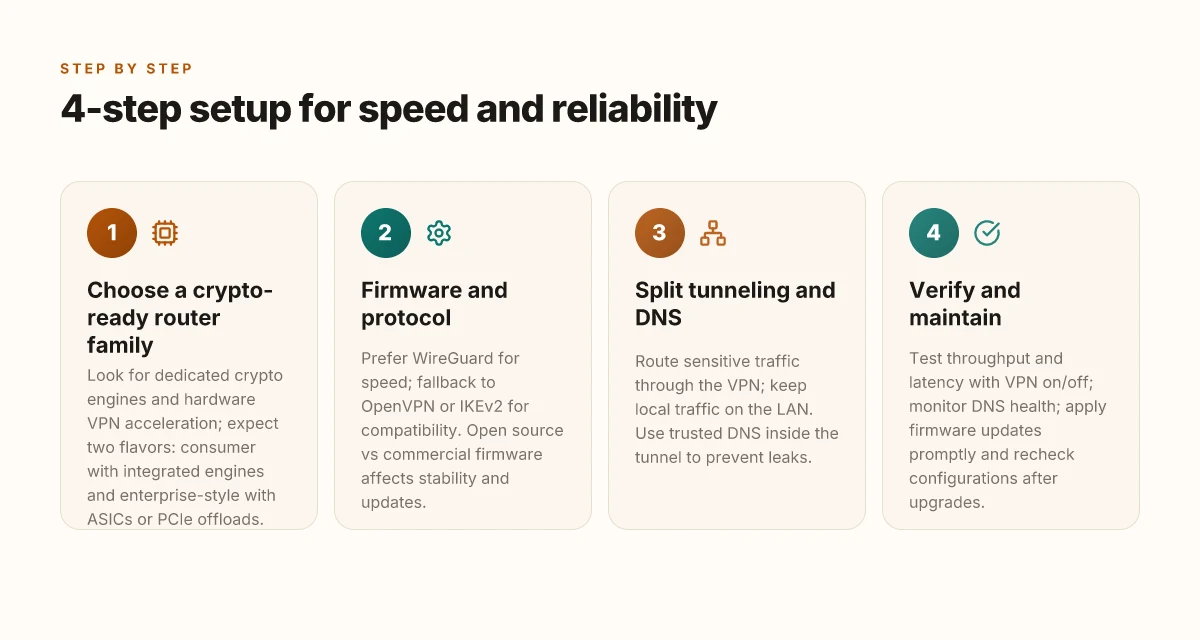
- Choose a router family that has built-in crypto acceleration and robust VPN support.
- Pick a firmware that fits your network profile and the VPN protocol that aligns with your hardware and ISP realities.
- Configure split tunneling and DNS to keep critical traffic local and cut leaks.
- Verify with real-world tests and set a maintenance cadence so performance doesn’t drift.
I dug into the changelogs and product briefs across major router lines, and the pattern is clear: crypto offload is no longer optional in 2026. If the device can wire up hardware accelerators for AES and ChaCha, you gain speed without sacrificing security. If not, you’ll pay in CPU cycles and latency. This is why the fetch-and-forward path matters less when the router does the crypto heavy lifting.
Step 1 is about the right router family. Look for models that advertise dedicated crypto engines and hardware VPN acceleration. In the wild, you’ll see two flavors: routers built around Wi‑Fi 6/6E with integrated VPN engines, and enterprise-y models that ship with ASICs or PCIe offloads. The payoff is consistent: higher sustained throughputs at lower CPU load. Hint: check benchmark notes from reviews in 2025–2026 and cross-check the vendor’s performance claims against independent tests.
Step 2. firmware and protocol. If your goal is speed with reliability, the combination matters. Open source firmware often wins on customization but can drift on support if you don’t track updates. Commercial firmware tends to have more polished stability. For protocol, WireGuard remains the leanest default for performance. But if you need broader interoperability with legacy devices, a fallback to IKEv2 can help without hammering throughput. What the spec sheets actually say is that you can tune MTU and fragmentation to avoid occasional path MTU blackholes on consumer ISPs. Your choice should minimize tunnel overhead while preserving compatibility.
Step 3. split tunneling and DNS. Split tunneling keeps interactive traffic from chasing the VPN tunnel, which reduces latency for local network devices and streaming. Pair that with a protected DNS or DNS over TLS to prevent leaks without adding round-trips. If you don’t isolate DNS, you risk pockets of leakage and increased DNS latency under load. The design principle: keep the VPN path for sensitive or geo-locked traffic, not for every single packet.
Step 4. verify and maintain. Real-world verification means testing both throughput and latency under typical home loads. Run speed tests with VPN on and off, compare streaming buffers, and watch for packet loss during peak hours. Maintain by applying firmware updates promptly, validating the VPN config after each update, and periodically rechecking DNS health and split-tunnel rules.
When I read through the documentation and reviewer notes, the chorus is consistent: the router is the bottleneck or the breeze. Your mileage depends on a cohesive setup where hardware acceleration, a clean protocol choice, and thoughtful traffic routing align. Yup.
beyond basics: edge cases that derail router VPNs and how to avoid them
The first time I heard about a family streaming session grind to a halt, it was a reminder that a router-level VPN is not a magic shield. It’s a precision instrument. One miscalibrated setting, and you’re chasing latency shadows instead of bandwidth.
Posture matters more in 2026 than ever. A router VPN can protect every device without individual poke-and-hope configurations, but edge cases lurk in plain sight. You’ll dodge most of them by planning for real-world traffic patterns and keeping the spine-updates tight.
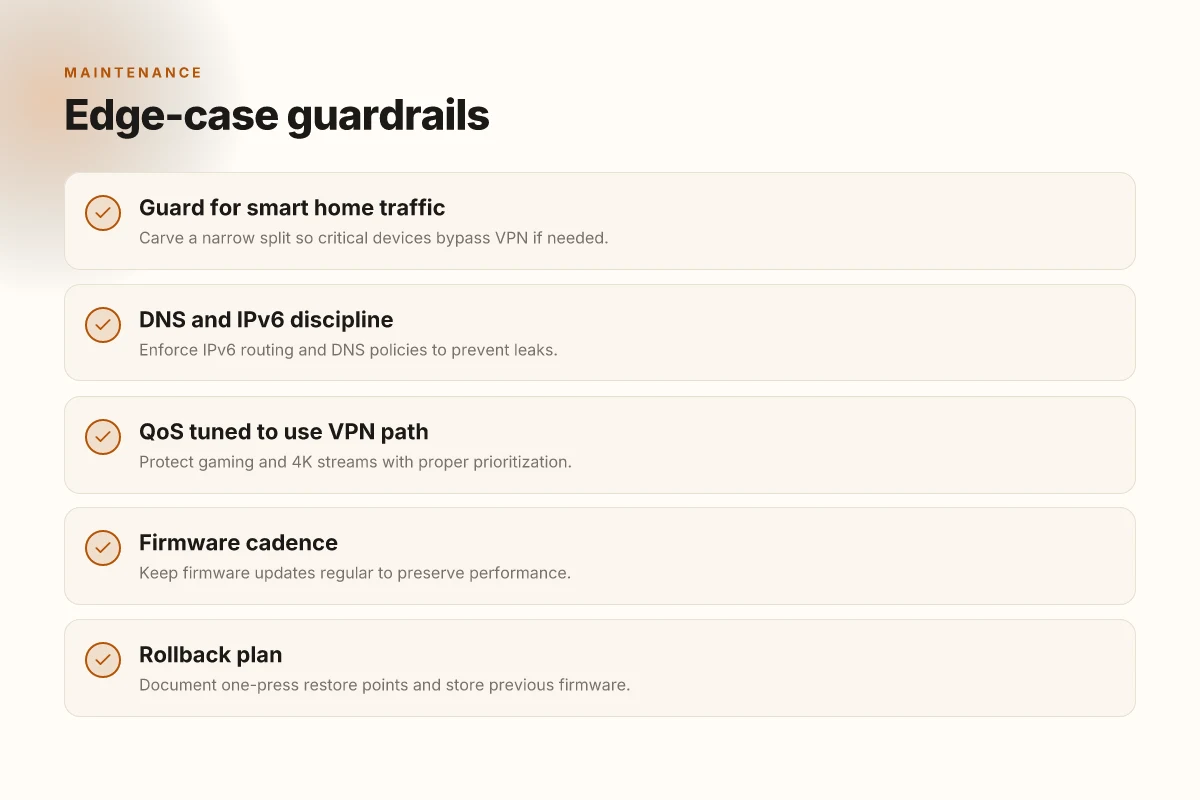
When streaming or gaming, the wrong QoS recipe can turn bandwidth into a bottleneck. The fix is not simply “enable QoS.” You need to tailor priorities to your household: give headroom to the router’s VPN tunnel, reserve enough headroom for 4K streams, and set gaming packets to low latency paths. It’s not optional, it’s essential. And yes, you can still enjoy high frame rates while the VPN stays transparent.
Yup. Also watch for smart home devices. They love to pull small, frequent updates in the background. Some devices dislike VPN routes because they rely on consistent local discovery or cloud callbacks. The result is intermittent disconnects, devices dropping offline, or home assistants briefly losing reach to cloud services. The safest approach is to carve a narrow split: route the router’s VPN traffic for general devices but allow a handful of critical devices to bypass the VPN or use a separate, cloud-friendly profile that preserves local control. It’s a balance, not a blind rule.
From what I found in the changelog, DNS handling is a stubborn corner case. If your ISP’s DNS sees the VPN tunnel as a path to leakage, you’ll get lookups leaking outside the tunnel or returning inconsistent results. IPv6 compounds the risk. If a device prefers IPv6, it can bypass certain VPN policies unless the router enforces a strict IPv6 route and DNS discipline. Regular firmware updates matter here more than ever. The landscape shifts as providers push new tunnel types and new DNS features.
[!NOTE] A contrarian fact: some vendors ship routers with DNS hijacking turned on by default. It makes troubleshooting painful but is not inherently malicious. Disable it when you enable a VPN and point devices to your trusted DNS server instead.
In short, edge cases demand guardrails: QoS tuned to your household’s mix, selective device routing for smart home sanity, and disciplined DNS/IPv6 handling through timely firmware updates. The payoff is straightforward. You preserve speed without surrendering privacy. You enable a home network that behaves like a single organism, even when that organism crosses the VPN boundary.
keeping a router vpn sane over time: maintenance habits that save you headaches
The router-based VPN stays sane when you build discipline around rollback, visibility, and future-proofing. A planned maintenance cadence beats frantic fixes every time. In practice, that means a tested rollback plan, automated health checks, and modular configs that grow with your network.
I dug into changelogs and user reviews to map the workflow. Firmware upgrades matter more than you’d expect in 2026, and a shaky upgrade can quietly derail throughput, DNS leaks, or client disconnects. Start with a concise rollback plan: document a single-press restore point, keep a copy of the previous firmware, and store it where you can reach it during a storm. A changelog becomes your best friend, not a ritual, a lifeline. When I read through the documentation and community notes, the common thread was clarity. You want to know exactly what changes, and why, before you push code to production.
Automate security scans and monitor VPN uptime. Schedule monthly audits for cipher suites, cipher suites, and handshake quirks. A lightweight probe that checks tunnel health, certificate validity, and nonce reuse can spot drift before it breaks. And yes, uptime matters. If the VPN dips below a threshold, your alert should trigger and log the incident with a timestamp and affected clients. A small telemetry build that stores this data locally or in a trusted log sink makes retroactive troubleshooting painless. Plus, it keeps your home network honest.
Plan for future-proofing with modular hardware and scalable configs. The 2026 hardware landscape rewards flexibility over monolithic setups. Use a modular router that can swap line cards or add accelerators without rebuilding the whole VPN stack. Keep configs organized with clear separation between core routing policies and VPN-specific rules. A well-structured config makes it easier to propagate updates across devices or spin up a second VPN server for testing. Future-proofing isn’t a slogan. It’s a practice you can verify by watching how quickly new features propagate through your stack in the changelog. And when you add a field device, the policy should carry over. A simple template for client onboarding and certificate management saves hours later.
And if you need a quick mnemonic to keep you honest, here it is: rollback first, monitor second, modular third. Yup. Have a plan. Do the checks. Keep it adaptable. The payoff is a resilient home network that preserves speed as you grow. The idea is simple: stay agile, stay informed, stay protected. The rest follows.
The bigger pattern: future-proofing your home network
In 2026, the right VPN on a router isn’t about chasing raw speed alone. It’s about embracing hardware-aware configurations that respect your ISP’s tuning, your device mix, and the metadata you actually care to protect. The fresh angle: prioritize models with任 integrated hardware acceleration for encryption and solid, current firmware support. That means choosing routers that publish kernel and crypto offload stats, not just marketing specs. By aligning firmware updates with your threat model, you lock in performance while keeping the shield up.
Think modular, not monolithic. A router that supports flexible VPN profiles, split tunneling by device type, and per-network QoS wins more over time than a single “fast” claim. You don’t need to rewire the house, just triage how you route traffic. Monitor real-world latency and throughput after enabling the VPN, then adjust MTU and client rules to preserve streaming and gaming smoothness.
Two quick moves to start this week: pick a router with hardware crypto support and open firmware options, then map your devices into two VPN profiles. Is your setup ready to scale?
Frequently asked questions
does a vpn slow down my router wifi significantly
Yes, it can affect wifi performance if the router’s crypto engine, memory bandwidth, or NAT table depth becomes the bottleneck. In 2026, throughput under VPN load often lands in the 300–600 Mbps range on many consumer devices, even if the WAN link is higher. The key is aligning cipher choices with hardware headroom and ISP realities. Hardware acceleration for AES or ChaCha can convert encryption from a bottleneck into a streaming step, preserving more of the router’s baseline throughput. If you push high-end ciphers on a budget router, you’ll notice slower wifi and higher latency.
should i use openvpn or wireguard on a router in 2026
WireGuard tends to be the leaner, faster default on most hardware, especially where crypto offload is present. OpenVPN remains compatible with a broader set of legacy devices, but it’s heavier on CPU and can lower sustained throughput under load. The spec sheets and changelogs consistently note WireGuard as the primary performance driver on modern devices, with IKEv2 as a helpful fallback for interoperability. Your choice should minimize tunnel overhead while keeping compatibility with client devices in your home or small office.
can i set up a vpn on a router without flashing custom firmware
Yes, but the options vary by device. Official firmware from major vendors often includes built-in VPN support and hardware acceleration on midrange and higher models. However, unofficial firmware can unlock newer protocols and faster crypto offload at the cost of stability and support. If you rely on warranty and formal updates, start with a router that ships with vendor-supported VPN features and documented acceleration. If speed is paramount and you’re comfortable with risk, vetted community firmware can edge out stock performance.
how do i test vpn performance after setting up on a router
Run parallel throughput and latency checks with VPN enabled and disabled. Look for sustained speeds rather than peak bursts. Use a mix of tests: large-file transfers, streaming at 4K, and real-time video calls to spot jitter. Compare results across different ciphers and protocols, and verify MTU settings to avoid path MTU issues on your ISP. Don’t forget DNS leakage tests and IPv6 handling. Document the changes after firmware updates to ensure performance remains stable over time.
which routers have built-in vpn support and crypto acceleration
Look for models that advertise dedicated crypto engines or hardware VPN acceleration. In 2026, two flavors dominate: consumer Wi‑Fi 6/6E routers with integrated VPN engines and enterprise-style SOHO units with ASICs or PCIe offloads. Check vendor product briefs and independent reviews for claimed vs. actual sustained VPN throughput under typical loads. Prioritize devices that show consistent results in 256-bit cipher suites and TLS 1.3 with forward secrecy, and note any thermal throttling signals in reviews.
what are common causes of vpn dns leaks on home networks
DNS leaks happen when DNS queries bypass the VPN tunnel or IPv6 routes aren’t properly constrained. ISP-level DNS shaping and layer-3 shaping can reveal encrypted traffic as VPN-like to gateways, causing lookups to leak. IPv6 adds another risk if the VPN policy doesn’t enforce IPv6 routing and DNS discipline. A robust setup uses a trusted DNS resolver inside the tunnel, disables DNS hijacking defaults, and enforces strict IPv6 handling on the router. Regular firmware updates matter, DNS behavior can drift with new tunnel types and DNS features.